
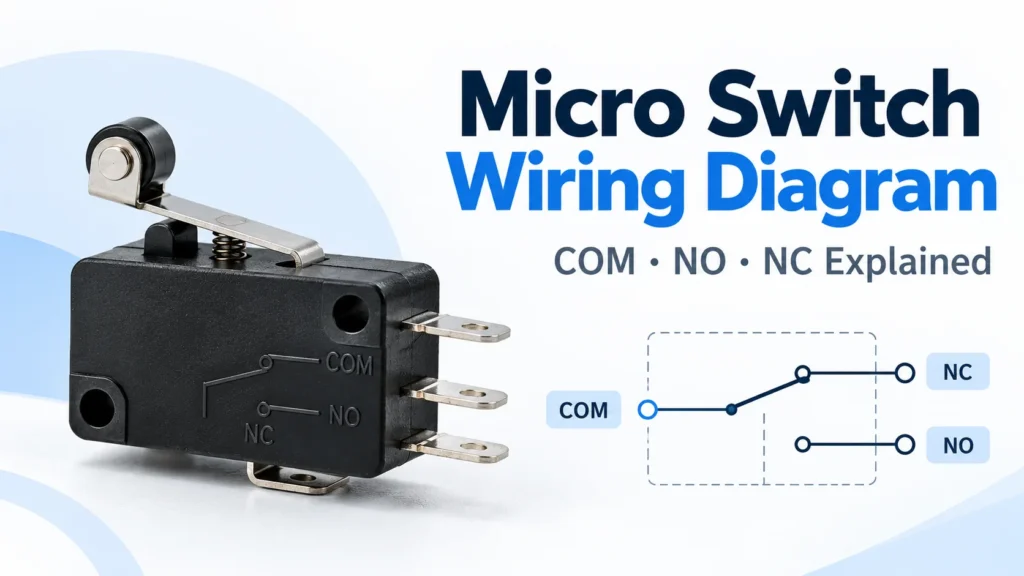
Micro Switch Wiring Diagram: COM, NO & NC Explained
Introduction
A micro switch wiring diagram is an essential reference for understanding how a micro switch connects to an electrical circuit. Whether you are working with industrial automation equipment, household appliances, control panels, or mechanical position detection systems, correct wiring helps ensure reliable switching and proper equipment operation.
Micro switches are widely used because they can convert small mechanical movements into electrical signals. However, identifying the correct terminals is just as important as choosing the right switch. Connecting the wrong terminals may cause a device to operate unexpectedly, fail to respond, or activate under the wrong conditions.
Most conventional three-terminal micro switches use three contact designations: COM (Common), NO (Normally Open), and NC (Normally Closed). Understanding these connections allows engineers and technicians to select the appropriate switching behavior for different applications.
This guide explains how micro switch wiring works, how to identify terminal configurations, and how to test a switch before installation. It also introduces practical product options from Micsw for industrial and OEM applications.
What Is a Micro Switch Wiring Diagram?
A micro switch wiring diagram illustrates the electrical connections between the switch terminals and the surrounding circuit. It helps technicians understand how electricity flows when the actuator is released or pressed.
A micro switch typically contains an actuator, a snap-action mechanism, electrical contacts, terminals, and a protective housing. When mechanical force reaches the operating point, the internal mechanism rapidly changes the contact position.
This movement either establishes or interrupts an electrical connection, depending on the contact configuration.
Unlike a product photograph, a wiring diagram focuses on electrical functionality rather than physical appearance. It shows the contact relationships and, in a complete application diagram, how the switch connects to power, a load, or an input circuit.
Why Wiring Diagrams Are Important
Correct wiring is essential for control accuracy and equipment safety.
For example, a machine position switch may be required to send a signal only when a moving component reaches a specific location. Another application may require the circuit to remain connected until a door or cover is opened.
Although these applications may use similar micro switches, their required contact behavior is different.
A proper wiring diagram helps engineers identify those differences, select the correct terminals, and avoid unnecessary troubleshooting.
Understanding COM, NO, and NC Terminals
The most important part of a conventional three-terminal micro switch wiring diagram is understanding the relationship between COM, NO, and NC.
These terminals define how the internal electrical contacts behave when the actuator changes position.
COM: Common Terminal
COM stands for Common. It is the shared electrical terminal in a typical single-pole double-throw (SPDT) micro switch.
The internal moving contact connects COM to either NC or NO, depending on the actuator position.
In a simple low-voltage control circuit, COM may connect to one side of the control supply or signal circuit. The selected output terminal then completes the required circuit path.
However, COM does not automatically mean positive, negative, live, or ground. Its role depends on the circuit design.
NO: Normally Open Terminal
NO stands for Normally Open.
When the actuator is in its normal, unoperated position, the electrical connection between COM and NO is open.
When the actuator reaches its operating point, the internal contact changes position, closing the connection between COM and NO.
This configuration is commonly used when an electrical signal should be generated only after a mechanical action occurs.
For example, a position-detection mechanism may use the NO contact to signal that a moving component has reached its designated position.
NC: Normally Closed Terminal
NC stands for Normally Closed.
In the normal, unoperated position, COM and NC are electrically connected.
When the actuator operates, this connection opens.
Normally closed contacts are useful when a control circuit needs to detect a change from a normally conductive condition.
For example, an equipment monitoring circuit may use an NC contact to recognize when a mechanical component moves away from its normal position.
However, using an NC contact does not automatically make a system fail-safe. Safety functions require appropriate circuit architecture, component ratings, fault monitoring, and validation.
NO vs. NC Contact Comparison
The following table describes a typical SPDT micro switch.
| Actuator Position | COM–NO | COM–NC |
|---|---|---|
| Released | Open | Closed |
| Fully actuated | Closed | Open |
The diagram represents the switch in its normal mechanical state unless otherwise specified.
Engineers should always consult the exact product datasheet because terminal layouts, actuator orientations, and operating characteristics may differ between models.
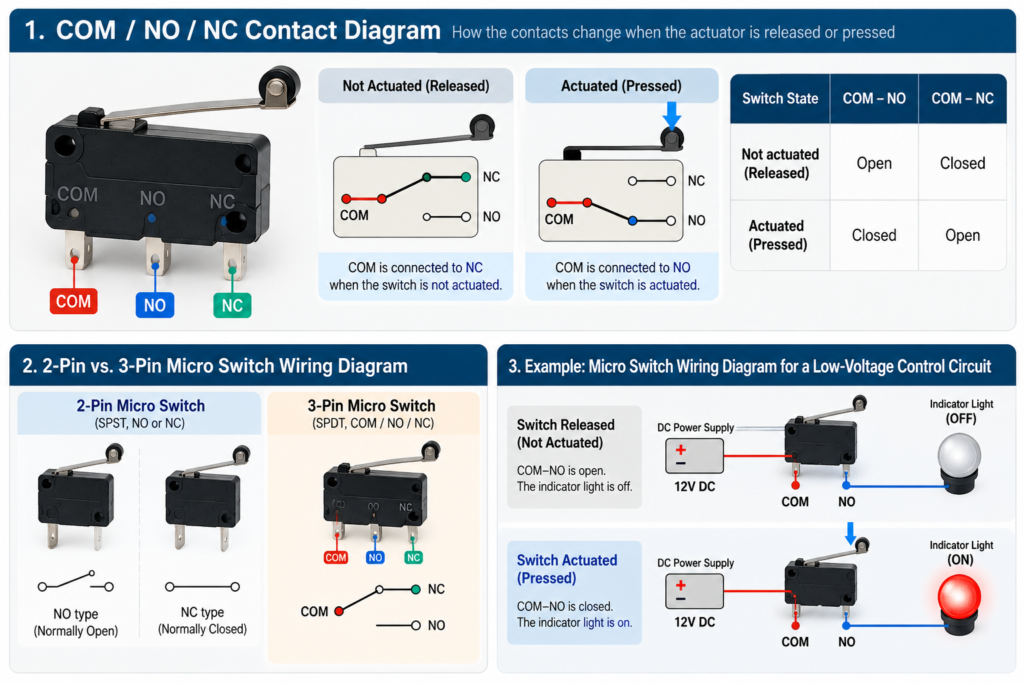
2-Pin vs. 3-Pin Micro Switch Wiring Diagram
Micro switches are available in different electrical configurations. Two-terminal and three-terminal designs are among the most common.
Understanding their differences helps users select suitable switching functions without unnecessary wiring complexity.
2-Pin Micro Switch Wiring Diagram
A conventional two-terminal micro switch provides one electrical contact path.
Depending on its design, it may be normally open or normally closed.
For a normally open version, the circuit remains disconnected until the actuator is pressed. Once activated, the contact closes and allows the circuit to conduct.
A normally closed version performs the opposite function: the contact conducts in the normal position and opens when activated.
Two-terminal switches are commonly used in simple detection and control applications where only one switching behavior is needed.
Typical examples include small mechanical triggers, basic position sensors, and appliance control mechanisms.
It is important to identify the actual contact type rather than assume that every two-terminal micro switch operates in the same way.
3-Pin Micro Switch Wiring Diagram
A typical three-terminal micro switch uses an SPDT contact arrangement with COM, NO, and NC terminals.
This arrangement allows the user to select either normally open or normally closed operation without replacing the switch.
For normally open operation, the circuit uses COM and NO.
For normally closed operation, the circuit uses COM and NC.
Both switched connections may be used in a suitable circuit, but their electrical ratings and the possibility of momentary transitions must be considered.
A three-terminal design provides greater flexibility for control applications where different contact states are required.
Key Differences
| Feature | 2-Pin Micro Switch | 3-Pin Micro Switch |
|---|---|---|
| Typical contact type | SPST | SPDT |
| Common terminals | Two contact terminals | COM, NO, NC |
| Contact behavior | One fixed NO or NC function | Selectable NO or NC connection |
| Wiring complexity | Simple | More flexible |
| Typical applications | Basic detection | Position feedback and changeover control |
The terms 2-pin and 3-pin refer to external electrical connections, not necessarily the number of mechanical mounting points or actuator components.
How to Wire a Micro Switch Step by Step
Correct installation begins with understanding both the switch and the circuit in which it will operate.
The following procedure describes general principles for a simple low-voltage control application. It is not a substitute for the equipment manufacturer’s approved wiring instructions.
Step 1: Identify the Switch Terminals
Before connecting wires, locate the terminal markings on the switch body or its technical documentation.
For a conventional three-terminal model, identify COM, NO, and NC.
Do not assume that the physical terminal order is identical across different manufacturers or models.
Some switches use quick-connect terminals, solder terminals, screw terminals, or pre-attached wires.
For sealed switches with cable leads, wire functions must be confirmed from the corresponding product specifications.
Step 2: Check Electrical Ratings
Every micro switch has defined electrical operating limits.
Before installation, verify the rated voltage, current, load category, and relevant operating conditions.
Switching a resistive load differs from switching a motor, solenoid, or other inductive load. Inductive loads can produce voltage transients and contact arcing, potentially reducing electrical life.
A switch used for low-current electronic signaling may also have different contact requirements from one used for higher-current control.
Always ensure that the selected model is suitable for the intended electrical load.
Step 3: Choose NO or NC Operation
Determine what should happen when the actuator operates.
If the circuit should become conductive when the actuator is pressed, a normally open connection is generally appropriate.
If the circuit should become disconnected when the actuator is pressed, a normally closed connection may be appropriate.
For example, a low-voltage position indicator can be configured to turn on when a moving mechanism reaches its endpoint by using COM and NO.
The final decision should follow the required operating logic of the equipment.
Step 4: Connect the Circuit
Disconnect and isolate all power sources before wiring.
For a simple, current-limited, low-voltage indicator circuit using a conventional SPDT switch, one possible arrangement is:
Positive supply → COM → NO → Indicator/load → Supply return
When the actuator is released, COM and NO remain disconnected, and the indicator stays off.
When the actuator reaches its operating point, COM connects to NO, completing the circuit and activating the indicator.
The indicator or load must be suitable for the supply voltage and current, and the circuit must include any necessary current limiting and protection.
For a normally closed control function, COM and NC may be used instead.
This simplified example explains contact behavior; it must not be applied directly to mains wiring, motor power circuits, or safety systems without proper engineering design.
Step 5: Verify Before Powering On
After making the connections, inspect the wiring and terminals.
Check that the conductors are secure, insulation is undamaged, and no exposed terminals can create unintended contact.
With the circuit completely de-energized and the switch isolated where necessary, use a multimeter to verify the expected contact changes.
Only after confirming correct wiring should power be restored in accordance with the equipment’s commissioning procedure.
How to Test a Micro Switch with a Multimeter
A multimeter provides a straightforward method for checking micro switch contact operation.
This test is especially useful when identifying unknown terminals, verifying a replacement switch, or investigating intermittent equipment faults.
Preparing for the Test
Disconnect all power sources and verify the circuit is de-energized.
Where practical, disconnect the switch from the surrounding circuit to avoid misleading readings through other components.
Set the multimeter to continuity or resistance mode.
A closed contact should produce a low-resistance reading, while an open contact should produce an open-circuit indication.
Testing COM and NC
Connect one probe to COM and the other to NC.
For a conventional SPDT switch, the meter should indicate continuity when the actuator is released.
Press the actuator until the switching point is reached.
The continuity indication should disappear, showing that the contact has opened.
Testing COM and NO
Move the second probe from NC to NO while keeping the first probe connected to COM.
With the actuator released, the meter should indicate an open circuit.
When the actuator operates, the meter should indicate continuity.
Repeat the test several times to confirm consistent switching.
Signs of a Faulty Micro Switch
A switch may require further inspection or replacement if it exhibits inconsistent continuity, excessive contact resistance, intermittent contact changes, or mechanical sticking.
A switch that operates correctly during a static continuity test may still perform poorly under its actual electrical load. Load-related faults require appropriate diagnostic procedures and equipment.
Common Micro Switch Wiring Mistakes
Several wiring mistakes can affect the reliability of a micro switch installation.
Confusing NO and NC
This is one of the most common problems.
Connecting a circuit to NC instead of NO reverses its intended switching behavior.
Always verify which contact should be conductive before and after actuation.
Assuming Terminal Positions Are Universal
Two switches may look almost identical while using different terminal arrangements.
Never identify COM, NO, and NC based only on physical location or the layout of another manufacturer’s product.
Use the actual markings and datasheet.
Exceeding the Electrical Rating
Applying an unsuitable voltage or current can damage contacts and shorten electrical service life.
Always consider the load type and switching conditions, not just the nominal current.
Incorrect Mechanical Installation
Excessive actuator force, insufficient travel, or poor alignment can affect switching performance.
Follow the manufacturer’s specified operating force, travel, and overtravel requirements.
Ignoring Environmental Conditions
Unsealed switches may be unsuitable for environments exposed to water, dust, or other contaminants.
Select a model with appropriate environmental protection and confirm the relevant ingress-protection rating when necessary.
Micro Switch Products from Micsw
Selecting the correct product is important because wiring requirements depend on the switch’s contact configuration, electrical rating, terminal style, and intended application.
Micsw offers micro switch solutions for electronic equipment, industrial machinery, automation systems, and other OEM applications.
V Series Micro Switch
The Micsw V Series Micro Switch is designed for general electrical and mechanical switching applications.
The series offers different actuator and terminal configurations, making it relevant to applications involving position detection, mechanical feedback, and equipment control.
Its product range includes multiple V-series variants suitable for different mechanical installation requirements.
For engineers evaluating a V Series micro switch, the first step is to confirm the exact model number and corresponding terminal configuration.
A generic COM, NO, and NC diagram can explain SPDT switching principles, but the exact wiring arrangement must be verified against the selected model’s documentation.
FST Series Waterproof Micro Switch
The Micsw FST Series Waterproof Micro Switch is intended for applications where additional environmental protection is required.
According to the product description, the FST series incorporates waterproof and dust-resistant construction, high-sensitivity switching, and durable contact materials.
It is suitable for various machinery and automatic control applications, particularly where moisture or dust may affect ordinary switching components.
For a waterproof micro switch, correct wiring involves more than identifying the contacts. Engineers must also consider cable connections, sealing integrity, mechanical mounting, and environmental exposure.
The wiring arrangement and lead identification should always be confirmed for the exact FST model being installed.
Choosing a Suitable Micro Switch
For OEM engineers and industrial buyers, product selection should begin with the intended electrical and mechanical requirements.
Important factors include contact arrangement, electrical rating, actuator style, operating travel, expected switching frequency, and environmental conditions.
Explore the Micsw Micro Switch product range to identify possible options for different applications.
Frequently Asked Questions About Micro Switch Wiring
What do COM, NO, and NC mean on a micro switch?
COM is the common terminal. NO is normally open, and NC is normally closed. In a typical SPDT micro switch, COM connects to NC when the actuator is released and switches to NO when the actuator operates.
What is the difference between a 2-pin and a 3-pin micro switch?
A typical two-terminal micro switch provides one normally open or normally closed contact path. A three-terminal SPDT micro switch provides COM, NO, and NC terminals, allowing either switching behavior to be selected.
How do I identify micro switch terminals?
Check the markings on the housing and the manufacturer’s datasheet. If necessary, use a multimeter to determine contact states with the circuit completely disconnected from power.
Can I use both NO and NC terminals on a micro switch?
Yes, on a suitably rated SPDT micro switch, both switched contacts can be incorporated into a properly designed circuit. The circuit must account for the contact transfer behavior and the switch’s electrical limits.
How can I tell if a micro switch is faulty?
A faulty switch may show inconsistent continuity, excessive resistance, intermittent electrical contact, or mechanical sticking. Testing both the released and actuated states with a multimeter can help identify contact problems.
Conclusion
Understanding a micro switch wiring diagram is essential for reliable circuit control and equipment operation. By identifying COM, NO, and NC terminals, engineers can determine the correct switching behavior and avoid common connection mistakes.
The differences between 2-pin and 3-pin switches, proper terminal verification, and basic multimeter testing are equally important during installation and troubleshooting.
For industrial and OEM applications, the selected switch must also match the electrical load, actuator requirements, and operating environment.
Micsw offers products such as the V Series Micro Switch and FST Series Waterproof Micro Switch for different control applications.
Looking for the right micro switch for your equipment? Contact Micsw to discuss product specifications, samples, and OEM switching solutions.